
Building Notion-powered AI Agents - Notion Agent API
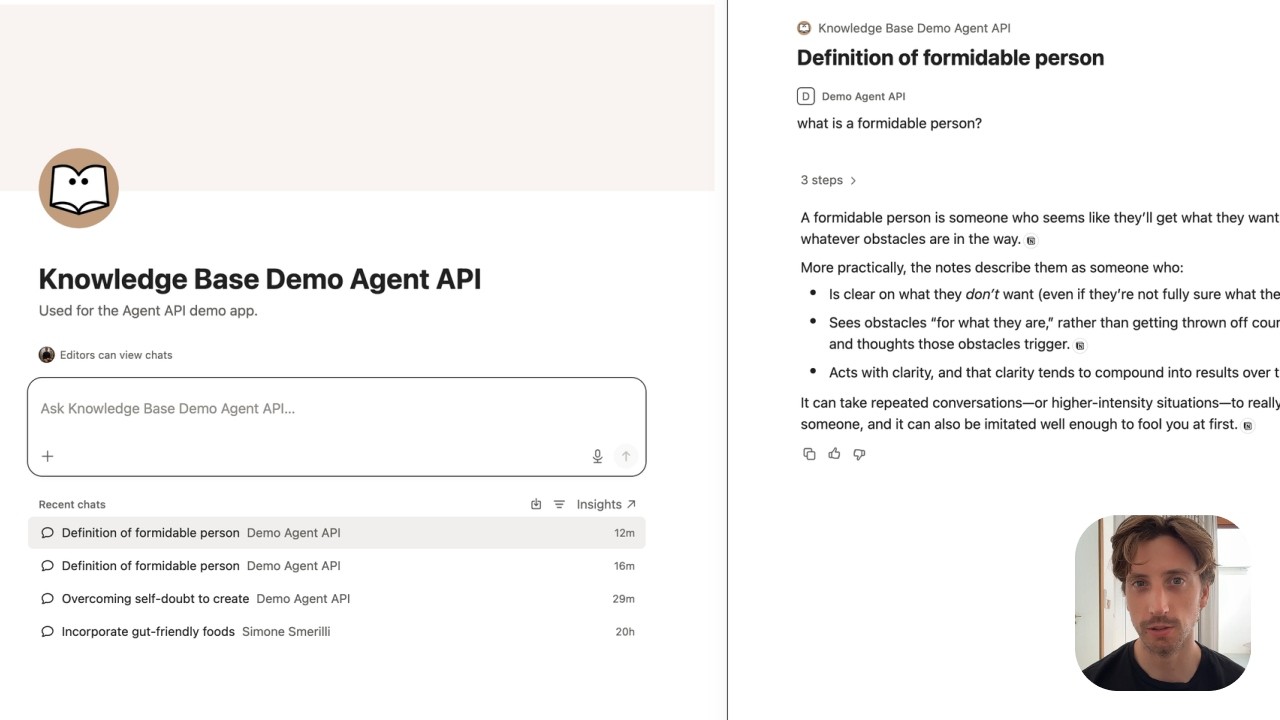
Say you built an app for a group of accountants to interact with each other and get insights from your multi-decade experience in the industry, which you are now passing on to the next generation. In addition to monthly calls, worksheets, and chats, you want to provide people with 24-hour access to an AI assistant that can answer their questions based on your specific knowledge, which you have been carefully curating in Notion.
With the Notion Agent API, you can implement this knowledge-retrieval AI assistant by using a Notion custom agent, without sharing access to your Notion workspace with your customers. It’s as if they could chat with a Notion custom agent, except they don’t have any access to Notion, nor can they retrieve information beyond the specific databases and pages accessible by the custom agent.
The custom agent will consume credits (which correspond to money) according to the number of runs.
Whenever you edit content in the knowledge base, it’s reflected immediately for the external users, too.
In the example I share in the video, I set up a custom agent that provides answers based on the writings I have published over the years, using the Agent API and a custom web app. Building the first version of this system took less than 30 minutes—using Notion AI to draft the custom agent, write the app code, and test.
These are the main steps I followed:
- Build a custom agent in Notion. Click here to learn more about custom agents.
- Build the user interface. This can be a custom app, or you can leverage an existing tool to trigger the custom agent chat (for example, Slack, Discord, Telegram, WhatsApp).
- Create an Internal Connection with Agent Capabilities. This allows you to use the Agent API to trigger the custom agent(s) and stream responses back to users.
- Use the connection token in the app as a secret environment variable.
The official Agent API docs are here. It’s worth noting that the Agent API is not just for triggering chats and streaming responses back to users, but it can also be leveraged to get visibility over custom agents’ credit consumption and usage, as well as build elaborate workflows for creating, updating, and deleting content across Notion and any other third-party tool (thanks to MCP Connections that can be set up in the Custom Agents’ Settings).
The Agent API is best used for small-scale projects and internal tools where you want a custom workflow or interface instead of letting people log into Notion. It allows meeting people where they already operate instead of asking them to adopt a new software.
Want to build effective systems and mindsets? Submit an enquiry, or browse products